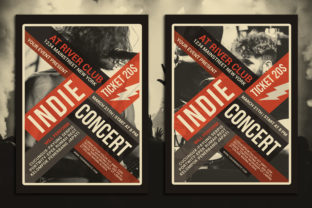
Indie Concert Flyer Design: A Practical Guide to Creating a Professional Print Ready File
Designing an Indie Concert Flyer is more than just creating a visually appealing layout—it's about crafting a communication tool that effectively conveys the event’s essence while being ready for print. Whether you're organizing a local music festival or promoting a small venue gig, the quality of your flyer can make a significant difference in how your audience perceives the event.
The Importance of a Well-Designed Indie Concert Flyer
An Indie Concert Flyer serves as the first point of contact between the artist and the audience. It needs to be eye-catching, informative, and easy to read. In today’s digital-first world, print materials still hold a unique value—especially for events that rely on physical distribution. A well-designed flyer can help attract attendees, build anticipation, and even serve as a promotional tool long after the event has ended.
One of the key reasons why a professional Indie Concert Flyer matters is its ability to communicate essential information quickly. From the date and time to the venue location and ticket details, every piece of information must be clear and accessible. The design should guide the viewer’s eye through the content without overwhelming them with too much text or visual clutter.
Specifications That Make an Indie Concert Flyer Stand Out
To ensure your Indie Concert Flyer looks great and functions properly when printed, it's important to follow specific design specifications. These guidelines not only help maintain consistency across different print runs but also ensure that your design is optimized for the intended medium.
Dimensions: A standard size for print-ready flyers is 8.27 x 11.69 inches. This size is ideal for both single-sided and double-sided printing, making it versatile for various distribution methods such as handouts, posters, or even digital downloads.
Bleeds: To avoid any white borders when the flyer is printed, it's crucial to include bleeds. Bleeds are extra margins that extend beyond the final trim size, ensuring that the design elements fully cover the edges of the paper. This is especially important for images or background graphics that might be cut off if not properly accounted for.
Resolution: For high-quality prints, your Indie Concert Flyer should be created at 300 dpi (dots per inch). This resolution ensures that the image appears sharp and detailed, avoiding pixelation or blurriness when printed. Lower resolutions may look fine on screen but will not translate well to print.
Color Mode: Always use CMYK color mode for print projects. Unlike RGB, which is used for digital displays, CMYK is the standard for offset and digital printing. Using RGB colors can result in unexpected color shifts when printed, leading to a less-than-ideal outcome.
Choosing the Right Fonts for Your Indie Concert Flyer
Fonts play a critical role in the overall look and feel of your Indie Concert Flyer. They can influence the tone of the design—whether it's modern, retro, edgy, or elegant. However, not all fonts are suitable for print, and some may not be available on all systems.
For a professional Indie Concert Flyer, it's best to use free, editable fonts that are widely available. These fonts are typically open-source or royalty-free, meaning they can be used without legal restrictions. Additionally, using editable fonts allows for greater flexibility in editing and customizing the design later on.
When selecting fonts, consider readability. Headings should be bold and legible, while body text should be clear and easy to read at a glance. Avoid using too many different fonts, as this can create a chaotic and unprofessional appearance.
It's also a good idea to keep a readme file with the list of fonts used in your design. This helps others who may need to edit or replicate the flyer in the future. Including font names and sources ensures that the design remains consistent and functional across different platforms.
Organizing Layers for an Editable Indie Concert Flyer
Whether you're using Adobe Illustrator, Photoshop, or another design software, organizing your layers is essential for maintaining a clean and manageable file. A well-structured layer system makes it easier to edit specific elements without accidentally altering other parts of the design.
Start by separating your design into distinct groups: background, text, images, and graphics. Each group should have its own layer or folder, allowing you to easily access and modify individual components. This organization is especially useful when working on collaborative projects or when making last-minute changes before print.
Additionally, using editable text is crucial for the longevity of your Indie Concert Flyer. If you plan to update the event details, having text in separate layers or text boxes allows you to change information without reworking the entire design from scratch.
Practical Tips for Creating an Effective Indie Concert Flyer
Creating an effective Indie Concert Flyer requires a balance between creativity and practicality. Here are some tips to help you get started:
- Keep it simple: Avoid overcrowding your design with too many elements. Focus on the most important information and present it clearly.
- Use high-quality images: Choose images that reflect the vibe of the event. High-resolution images will look better when printed and help make your flyer stand out.
- Test your design: Before printing, review your Indie Concert Flyer on different screens and in different lighting conditions to ensure it looks good in all environments.
- Include contact information: Make sure your flyer includes all necessary details, such as the venue address, website, and social media links. This helps potential attendees find more information about the event.
- Consider the audience: Tailor your design to the target demographic. For example, a younger crowd may prefer a more vibrant and stylized look, while a more mature audience might appreciate a cleaner, minimalist approach.
By following these guidelines and focusing on the essentials, you can create a professional and impactful Indie Concert Flyer that effectively promotes your event and engages your audience.